Chapter 2Shows
A show keeps everything for one program: its clip folder, cart deck, outline, devices, levels, stream and guest room. Open the show, and the whole desk is set up the way you left it.

The show buttons
| Show list | Opens another saved show. The desk changes to that show's devices, folder, deck and outline. |
|---|---|
| New | Starts a new, empty show. You give it a name. |
| Save | Keeps your changes in this show. The button lights up when there are unsaved changes. |
| Save as… | Keeps this show under a new name, as a copy. |
| Delete | Removes the saved show. Only the settings go: your clips, decks and recordings stay on your computer. |
If you are recording or streaming, CurryCaster II asks before it opens another show, because a show change sets up all devices again.
A new show gets its own cart deck
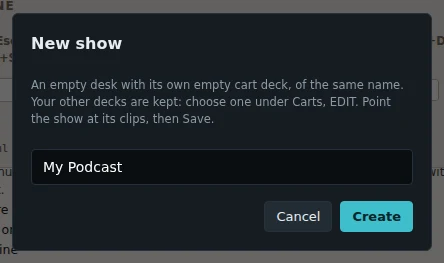
A new show starts with its own empty cart deck, with the same name as the show. A note above the cart wall says so:
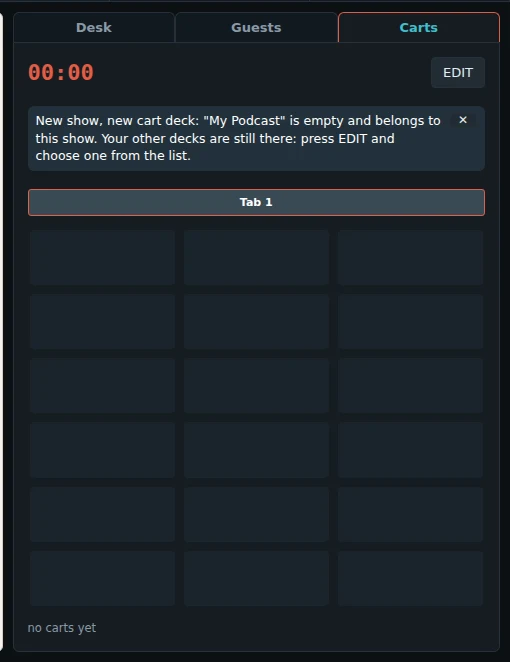
Your other decks are not gone. Press EDIT on the Carts tab and choose one from the list. Then press Save, so the show keeps that deck. See The cart wall.
The other buttons in the top bar
| ONE MIC / MIXER | Who mixes the show. See Sound. |
|---|---|
| ✂ EDIT | Opens a recording in the editor. See Edit and export. |
| Recordings | Opens the folder your recordings go to. |
| Outline | Only on a narrow window: shows the show outline full width. |
| STOP ALL | Stops every player and every cart at once. |