Chapter 11Stream
Stream your show live to an Icecast server.
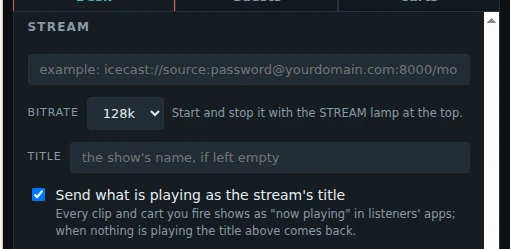
- On the Desk tab, under Stream, type your Icecast address. It looks like this: icecast://source:password@yourdomain.com:8000/mountpoint
- Choose the bitrate: 128k is a good choice.
- Type a title, or leave it empty to use the show's name.
- Press Save, so the show keeps the address.
- Press the STREAM lamp on the on-air bar to go live. Press it again to stop; it asks first.
Send what is playing as the stream's title: each clip and cart you play shows as "now playing" in your listeners' apps. When nothing plays, your title comes back.