Chapter 13MIDI controllers
Use a MIDI controller with faders and buttons to run the show without the mouse.
Suggested controller: the Korg nanoKONTROL2. It is small and low in cost, and it has 8 faders, 8 knobs and many buttons. It connects with one USB cable and needs no driver.
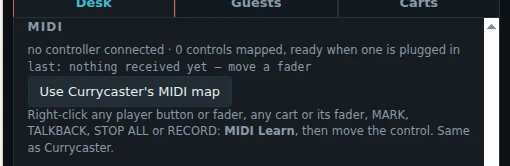
- Plug in the controller, at any time. The Desk tab, under MIDI, shows its name.
- Right-click a control on the screen and choose MIDI Learn.
- Move the fader or press the button on your controller. Done.
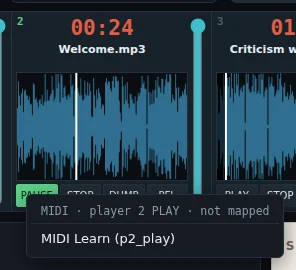
You can map:
- each player's PLAY, STOP, DUMP and PFL, and its fader,
- each cart and its fader,
- MARK, TALKBACK (held), STOP ALL and RECORD.
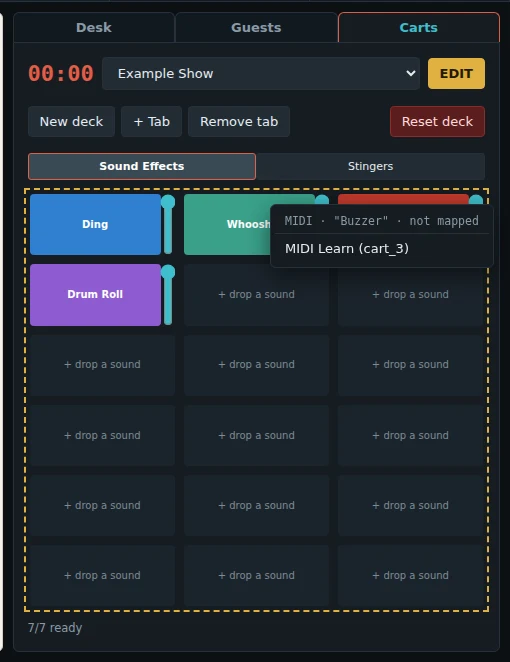
- The right-click menu shows what a control is mapped to now. Clear MIDI removes it.
- The last control you moved shows on the Desk tab, under MIDI. Use it to check that the controller works.
- The map is kept on this computer, for every show. A cart's control plays that cart position (for example cart 1) on whichever deck is up.
- Use Currycaster's MIDI map copies the map of the original Currycaster app, if you have it.
- A Stream Deck works too, with a MIDI plugin that makes its buttons send MIDI.