Your whole show desk.
One free app.
Microphone, players, a cart wall, your show outline, recording, streaming and an editor. Built by Adam Curry for live podcasting, and free to use.
How to install it
A few minutes, once. Choose your computer.
- Download CurryCaster II for Mac. It is a zip file, for Macs with Apple Silicon (M1 and newer).
- Open the zip in your Downloads folder: double-click it. CurryCaster II appears beside it.
- Drag CurryCaster II into Applications. Open a Finder window, and drag the app onto Applications in the sidebar.
- Open it from Applications or Launchpad.
If your Mac says “CurryCaster II” Not Opened and Apple could not verify…: click Done. Then open System Settings → Privacy & Security, scroll down to “CurryCaster II” was blocked…, click Open Anyway, and confirm with your password or Touch ID. You do this only once.
- Allow the microphone. The first time, your Mac asks if CurryCaster II may use the microphone.
Click Allow. Without it the desk hears nothing.
Clicked Don't Allow? Open System Settings → Privacy & Security → Microphone, and turn on CurryCaster II.
- You are ready. The Example Show opens with a User Guide. Choose your microphone and your headphones on the Desk tab.
- Download CurryCaster II for Windows. It is an installer, for 64-bit Windows 10 and 11.
If your browser warns that the file isn't commonly downloaded: in Edge, click … → Keep → Keep anyway. In Chrome, click Keep.
- Run the installer from your Downloads.
Windows shows a blue screen: Windows protected your PC. It has no Run button at first. Click More info, then Run anyway. You do this only once.
- Install. It installs for you only, with no administrator password, and makes a Start menu entry and a desktop icon. At the end, leave Start CurryCaster II ticked and click Finish.
- Check the microphone setting. If the desk hears nothing, open Settings → Privacy & security → Microphone, and turn on Let desktop apps access your microphone.
- You are ready. The Example Show opens with a User Guide. Choose your microphone and your headphones on the Desk tab.
- Download CurryCaster II for Linux. It is one AppImage file, for 64-bit PCs.
- Make it runnable: right-click it → Properties → Allow executing file as program. Or in a terminal: chmod +x CurryCaster-II-*.AppImage
- Double-click it to start. Nothing is installed; keep the file where you like, for example in ~/Applications.
- You are ready. The Example Show opens with a User Guide. Choose your microphone and your headphones on the Desk tab.
Your headphones: plug them into your USB microphone or your audio interface, so you hear yourself with no delay. See Read this first in the manual.
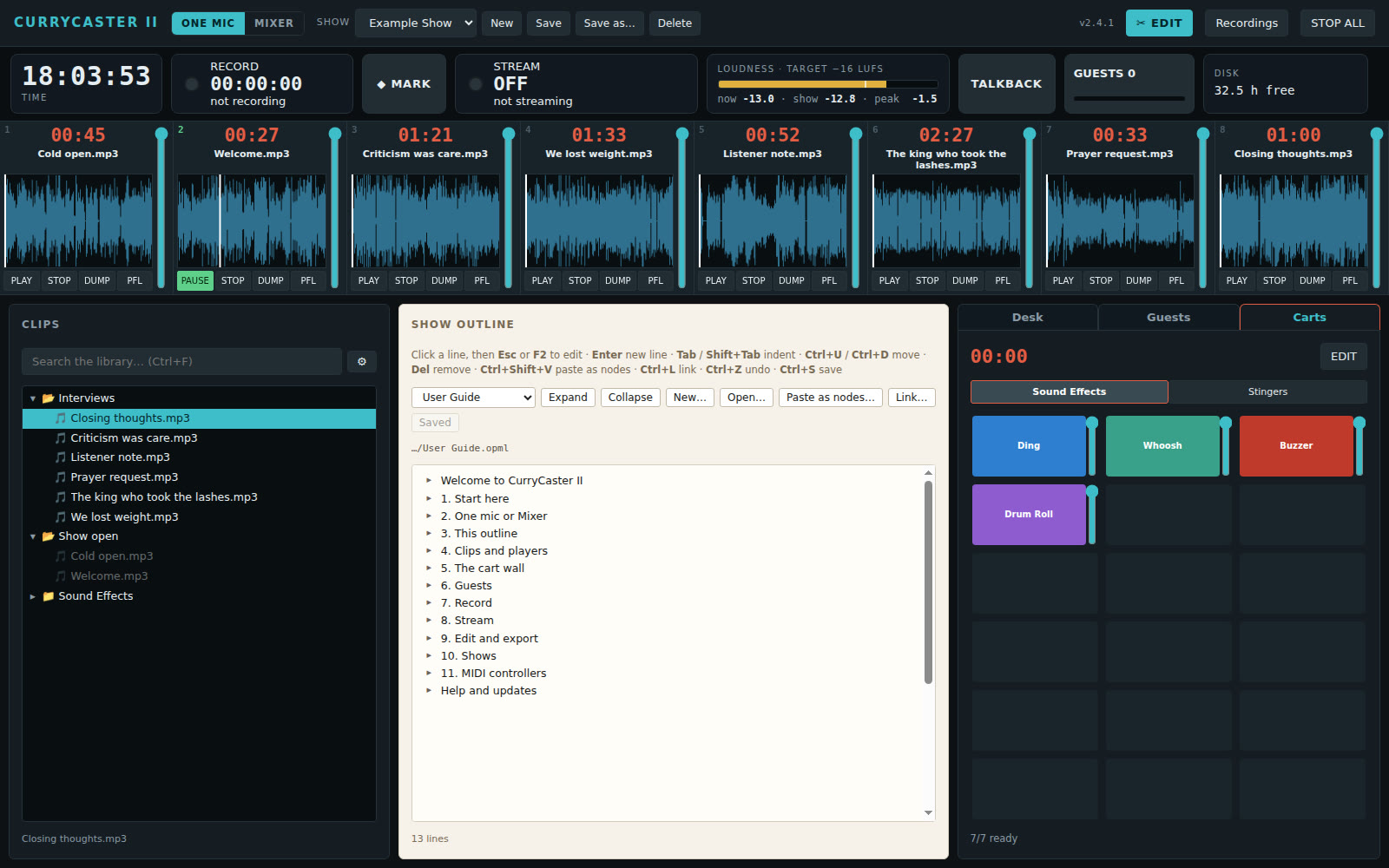
Everything for the show, in one window
No routing between apps, no loopback cables. The players and carts go straight into the mix, so what you fire is on the air at once.
🎚️Eight players
One click loads a clip. In and out points, a zoomable waveform, PFL to check a clip off the air, and clips you have played are dimmed.
🟦Cart wall
Stingers and sound effects on tabs. Each show keeps its own deck, and a reset can be undone.
📝Show outline
Your running order, notes and links in an outliner that reads and writes OPML.
⏺️Crash-proof recording
If the computer or the app crashes, the recording is safe and carries on in the same file.
📡Icecast streaming
Go live with one button. Each clip and cart you play shows as "now playing" in your listeners' apps.
✂️Editor and MP3 export
Cut, copy and paste on the waveform, then export an MP3 with chapters from your markers.
🎛️One mic or your mixer
Let the app mix a USB microphone, or let your mixing desk do the mix and send it the players and guests.
🎹MIDI controllers
Right-click any player, cart or button and move a fader to map it. A Stream Deck works with a MIDI plugin.
The guest room
Bring guests on the air from anywhere. They open a link in a browser, even on their phone. Nothing to install, no account to make.
- Open the room on the Guests tab. Your room is ready, nothing to set up.
- Send your link. It stays the same for every show, so a regular guest can keep it. It works well from a phone: a guest can join from the browser on their phone.
- Guests wait in the green room until you let them in. Nothing goes on air before you say so.
- Everyone hears everyone, the clips and the carts, but never themselves. Guests are recorded with your show.
- Processing for each guest: a gentle noise gate, a 3-band EQ, a compressor and a limiter on every guest line, with one on/off switch. Set each guest by ear, so a laptop mic and a studio mic sit together in the mix.
- Talkback: hold one button to talk to your guests off the air.
- 14-day free trial
- Your own room and guest link
- Processing for each guest: gate, EQ, compressor, limiter
- Green room and talkback
- Guests join from a computer or a phone
- Cancel any time, from the app
You start the trial from the app, on the Guests tab. The desk itself stays free.
Questions
Is the app really free?
Yes. The desk, players, carts, outline, recording, streaming and editor are free, with no time limit. Only the guest room is a subscription.
What do I need?
A computer and a microphone. A USB mixer works too. Headphones are best when you have guests.
- Mac: Apple Silicon (M1 and newer), macOS 13 Ventura or newer.
- Windows: Windows 10 or 11, 64-bit.
- Linux: a 64-bit PC (x86_64), for example Ubuntu 20.04 or newer.
- All: 4 GB of memory (8 GB is better), 1 GB of free disk space, and an internet connection for guests.
What do my guests need?
A browser and a microphone. A phone works well too: the guest opens the link in the phone's browser. They do not install anything and do not need an account. Headphones or earbuds give the best sound.
How does the free trial work?
Start it from the Guests tab in the app. You have 14 days of the guest room. Cancel before the end and you pay nothing.
How do I cancel?
From the Guests tab in the app, at any time. The room stays open until the end of the period you paid for.
Do I lose my shows if I stop paying?
No. Your shows, carts, outlines and recordings are on your own computer. Only the guest room closes.