CurryCaster II 2.4.14
Your guests can play their own clips on the show. No more "could you please play my clip": they load it, start it, stop it and jump around in it themselves, from their own page. Also new: a dark show outline, and a button that finds your mixer.
- Everyone who uses the guest room: 1. It is off until you switch it on, one guest at a time.
- Everyone who uses the show outline: 2.
- Everyone with a USB mixer: 3.
1. Guests play their own clips
Each guest in the room has a new CLIPS button on their line on the Guests tab. Press it, and three slots appear on that guest's page at once. They do not have to reload or come in again.
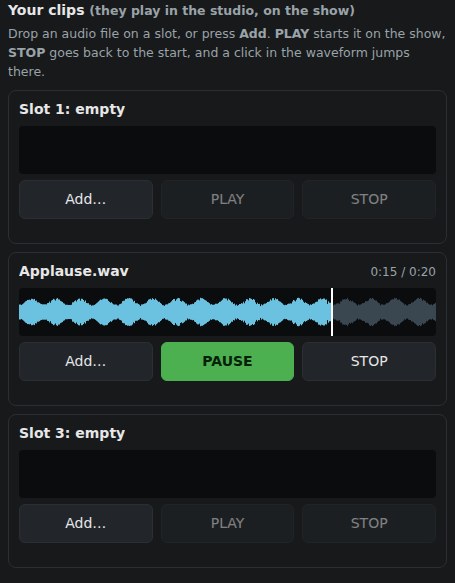
- Load: the guest presses Add… to choose a file, or drops a file on a slot. Slot 1 goes into your player 6, slot 2 into player 7, slot 3 into player 8, in place of what was there.
- Play: PLAY (and PAUSE), STOP back to the start, and a click in the waveform jumps there. The guest sees the clip play.
- Full quality: the clip plays on your desk, not over the guest's microphone. It is in the show at full quality, recorded and streamed, and everyone else hears it like any clip. A player on PFL plays on PFL, as always.
- You stay in charge: you can stop or replace those players at any time. A guest can press only a clip they loaded, and a player that is playing is never replaced under you. Press CLIPS again to take the slots away.
- Audio files only (MP3, WAV, AIFF, FLAC, OGG, Opus, M4A), up to 60 MB.
2. A dark show outline
Asked for on X: "I wish I could figure out how to get the show outline to a dark color like the rest of the interface." Press Dark above the outline, and it is dark like the rest of the desk. Light puts the paper back. Your computer remembers the choice.
3. Find your mixer
In MIXER mode, press Find your mixer and talk into your microphone for a few seconds. CurryCaster II listens to every audio device that is not the computer's own, keeps the one that moves with your voice as your main mix, and sends the players and carts to the same mixer.
If it finds no mixer, or hears nothing while you talk, it says so, and what to check. You can always choose the devices by hand.
How to update
Open CurryCaster II. A blue bar at the top offers 2.4.14: press Download, then install it as you did the first time. Or download it here:
Your shows, carts, recordings, settings and guest-room key stay as they are. Your guests need nothing new: their page has the slots already.
Earlier release: 2.4.13: drag files from the Finder onto a player, waveforms for long WAV and FLAC.
Questions? adam@curry.com